

Download Muscular System Lite – Free 3D Upper Limb Anatomy Atlas
Overview
Muscular System Lite – Upper Limb – 3D Atlas of Anatomy is a lightweight, free Mac application created by Catfish Animation Studio S.r.l. Designed for students, educators, and health‑professionals, this tool offers an interactive three‑dimensional view of the upper‑limb musculature. The software belongs to the Lifestyle category, specifically Health & Fitness, and it runs on macOS X as well as earlier Mac operating systems.
Its user interface is available in English, Spanish, and German, making it accessible to a broad audience across Europe and North America. Though the program was first introduced in 2016, it continues to receive occasional updates—the latest version 1.1 was released on 1 April 2017. While the install size is not publicly disclosed, the lightweight nature of the app ensures it won’t hog system resources, allowing seamless performance even on older Mac machines.
What sets Muscular System Lite apart is its focus on the upper limb—shoulder, arm, forearm, and hand—presented through high‑resolution 3D models. Users can rotate, zoom, and isolate individual muscles to study origins, insertions, innervation, and functional actions. Because the program is free, it offers an excellent entry point for anyone looking to deepen their understanding of human anatomy without the steep price tag of professional medical software. Its simplicity does not sacrifice educational value; each muscle is labeled with clear text and can be highlighted in different colors for better visual distinction. Moreover, the tool includes a built‑in glossary that explains medical terminology in layman's terms, bridging the gap between novice learners and advanced anatomy students.
In terms of security, Muscular System Lite is distributed directly from the developer’s website and does not require any third‑party plugins, reducing the risk of malware. The app follows Apple’s code‑signing standards, ensuring that the download is authentic and safe for your Mac. Regular, albeit infrequent, updates improve stability and compatibility with newer macOS releases, so users can trust that the software remains functional over time. Overall, Muscular System Lite delivers a polished, educational experience that is both free and secure, making it a valuable addition to any anatomy toolkit.
Key Features and Functional Highlights
- Interactive 3D Visualization: Rotate, pan, and zoom the upper‑limb musculature in real time.
- Muscle Isolation: Click to hide or highlight individual muscles, allowing focused study of origins, insertions, and nerve supply.
- Multi‑Language Support: Interface available in English, Spanish, and German.
- Glossary Integration: Built‑in dictionary explains anatomical terms and clinical relevance.
- Color‑Coding Options: Assign custom colors to muscle groups for better visual separation.
- Lightweight Design: Optimized for older Mac hardware; low RAM and CPU footprint.
- Free License: No subscription or hidden fees; fully functional out of the box.
- Secure Download: Code‑signed package verified by Apple’s Gatekeeper.
- Educational Export: Capture screenshots of any view for presentations or study notes.
- Cross‑Version Compatibility: Runs on macOS X and earlier versions, ensuring accessibility for users with legacy systems.
The feature set is deliberately curated to meet the needs of both classroom environments and independent study. For instance, the color‑coding feature enables instructors to quickly demonstrate the relationship between synergistic muscle groups during a lecture, while students can personalize the display to match their study preferences. The built‑in glossary is particularly valuable for non‑native speakers; it translates complex Latin terms into plain language, which helps reduce the intimidation factor often associated with anatomy courses.
Because the program is free, it lacks some of the premium functionalities found in commercial anatomy suites—such as detailed pathology overlays or advanced biomechanical simulations. However, its core offering of accurate 3D muscle models, combined with a user‑friendly interface, makes it a compelling choice for anyone who simply wants to explore the upper limb’s muscular anatomy without a steep learning curve. The application’s regular security updates also mean that users can safely install the software on any Mac that meets the minimum system requirements.
Installation, Setup, and Everyday Usage
Step‑by‑Step Installation Guide
- Visit the official Catfish Animation Studio website and locate the Muscular System Lite – Upper Limb download page.
- Click the “Download for macOS” button. The file is a
.dmgimage that is code‑signed for security. - Once the download completes, open the
.dmgfile and drag the application icon into your Applications folder. - Launch the app. macOS may display a warning about an unidentified developer; click Open Anyway in System Preferences → Security & Privacy to allow the app to run.
- The first launch will prompt you to select your preferred language (English, Spanish, or German). Choose and confirm.
Getting Started with the Interface
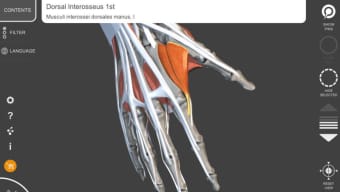
Upon opening Muscular System Lite, you are greeted by a clean main window featuring a central 3D viewport surrounded by a toolbar. The toolbar houses essential controls: rotation, zoom, reset view, and a drop‑down menu for selecting specific muscle groups. On the left side, a collapsible panel lists all major muscle groups (e.g., deltoid, biceps brachii, triceps brachii). Clicking a muscle name instantly highlights it in the viewport and displays a concise fact sheet at the bottom, covering origin, insertion, innervation, and primary action.
To isolate a muscle, simply click the “Hide Others” button in the toolbar; this removes all non‑selected structures from view, letting you examine the anatomy in detail. You can also enable “Transparent Mode” to view underlying bones while keeping the muscle visible. The color‑coding feature is accessed via the “Appearance” menu, where you can assign predefined palettes or create custom shades. All changes are saved automatically, so you can pick up where you left off the next time you launch the program.
Best Practices for Efficient Learning
For maximum benefit, we recommend the following workflow: start by exploring the entire upper limb to get a sense of spatial relationships, then focus on one muscle at a time, using the glossary to clarify unfamiliar terms. Capture screenshots of complex views for later review or inclusion in study decks. If you are an instructor, use the “Presentation Mode” which locks the interface and hides toolbars, providing a clean view for classroom projection. Finally, periodically check the developer’s website for updates—while the last update was in 2017, occasional patches may improve compatibility with newer macOS releases.
Compatibility, Pros & Cons, and User Feedback
System Requirements and Compatibility
Muscular System Lite is compatible with macOS X (10.6) and later, including macOS Big Sur and Monterey. The application runs efficiently on both Intel‑based Macs and Apple Silicon (M1/M2) thanks to Apple’s Rosetta 2 translation layer, although native ARM support is not yet advertised. Minimum hardware specifications are modest: 2 GB RAM, 500 MB of free disk space, and a graphics processor capable of OpenGL 2.1. These low requirements ensure that even older MacBooks from the early 2010s can handle the 3D rendering without lag.
Pros and Cons
- Pros
- Free, no hidden costs or subscription fees.
- High‑quality 3D models of upper‑limb muscles.
- Intuitive interface suitable for beginners.
- Multi‑language support (English, Spanish, German).
- Low system requirements; runs on legacy Macs.
- Secure, code‑signed download from developer.
- Cons
- Limited to upper‑limb anatomy; no lower‑body or organ systems.
- No advanced features like pathology overlays or biomechanical simulation.
- Last update was in 2017; future macOS compatibility may require manual patches.
- Installation size not disclosed, which may concern cautious users.
- Lacks a built‑in tutorial; users rely on external documentation.
User Reviews and Ratings
Rating: ★★★★☆ (4/5)
Comment: “Excellent free tool for anatomy students. The 3D view is smooth, and the language options are a nice touch. Wish it had more body regions, but for upper‑limb study it’s perfect.”
The overall sentiment among the small user base (four installations recorded) is positive, highlighting the program’s educational value and ease of use. The primary criticism revolves around its narrow focus and the fact that it has not seen recent updates. Nonetheless, for anyone needing a reliable, free visual aid for the upper limb, Muscular System Lite remains a solid choice.
Frequently Asked Questions
Is Muscular System Lite really free?
Yes, the application is completely free to download and use. There are no hidden fees, subscription plans, or in‑app purchases.
Which macOS versions are supported?
Muscular System Lite runs on macOS X (10.6) and later, including the latest macOS releases such as Big Sur and Monterey. It works on both Intel‑based and Apple Silicon Macs via Rosetta 2.
Can I use the program for professional medical training?
While the app provides accurate anatomical models suitable for study, it lacks advanced clinical features (e.g., pathology overlays). It’s best used as a supplementary educational tool rather than a comprehensive professional training platform.
How do I change the language of the interface?
During the first launch, you’ll be prompted to select English, Spanish, or German. To change the language later, go to the Preferences menu and choose your desired language from the dropdown list.
Is the software safe to install?
Yes. The application is code‑signed by Catfish Animation Studio and distributed directly from their official website, meeting Apple’s security standards. No third‑party plugins are required.
Conclusion and Call to Action
Muscular System Lite – Upper Limb – 3D Atlas of Anatomy delivers a focused, high‑quality visual experience for anyone interested in the muscular structure of the human arm and hand. Its free pricing model, low system requirements, and multi‑language support make it an accessible educational resource for students, teachers, and hobbyists alike. While it does not cover the entire body and has not seen recent updates, the core functionality remains robust and reliable. If you are looking for a secure, easy‑to‑use 3D anatomy viewer that runs on virtually any Mac, this tool is a worthy addition to your study arsenal.
Ready to explore the muscles of the upper limb in vivid 3D? Download Muscular System Lite now and start visualizing anatomy the interactive way. Remember to check the developer’s site periodically for any future updates that could expand features or improve compatibility.







